

Apple has introduced a major change to its MacBook Pro lineup. The new Touchscreen MacBook Pro 2026 brings touchscreen support to Mac for the first time, along with an advanced PROLED XDR display, powerful M5 Pro and M5 Max chips, and a redesigned, lighter body.
For years, Apple kept touchscreen technology mainly for its iPad and iPhone products. However, the latest MacBook Pro changes that approach. Users can now interact directly with the screen while still enjoying the traditional keyboard and trackpad experience.
Announced on October 28, 2026, the new MacBook Pro targets professionals, creators, developers, and users who need powerful performance with more flexible ways to work.
Here is everything you need to know about its features, display, performance, battery life, pricing, and availability.

Apple Introduces Its First Touchscreen MacBook Pro
The biggest highlight of the new MacBook Pro is touchscreen support, bringing touch interaction to Mac for the first time.
Users can now interact directly with macOS through the display, making everyday tasks easier and giving creative professionals more control.
Some useful touch features include:
- Scroll through websites with your fingers.
- Pinch to zoom in on photos and documents.
- Drag and drop content between apps.
- Move windows using touch gestures.
- Work directly with creative tools.
The touchscreen does not replace the keyboard or trackpad. Instead, Apple has designed it to work alongside existing controls, giving users more ways to use their MacBook.
PROLED XDR Display: A Major Visual Upgrade
The display is another important improvement in the new MacBook Pro.
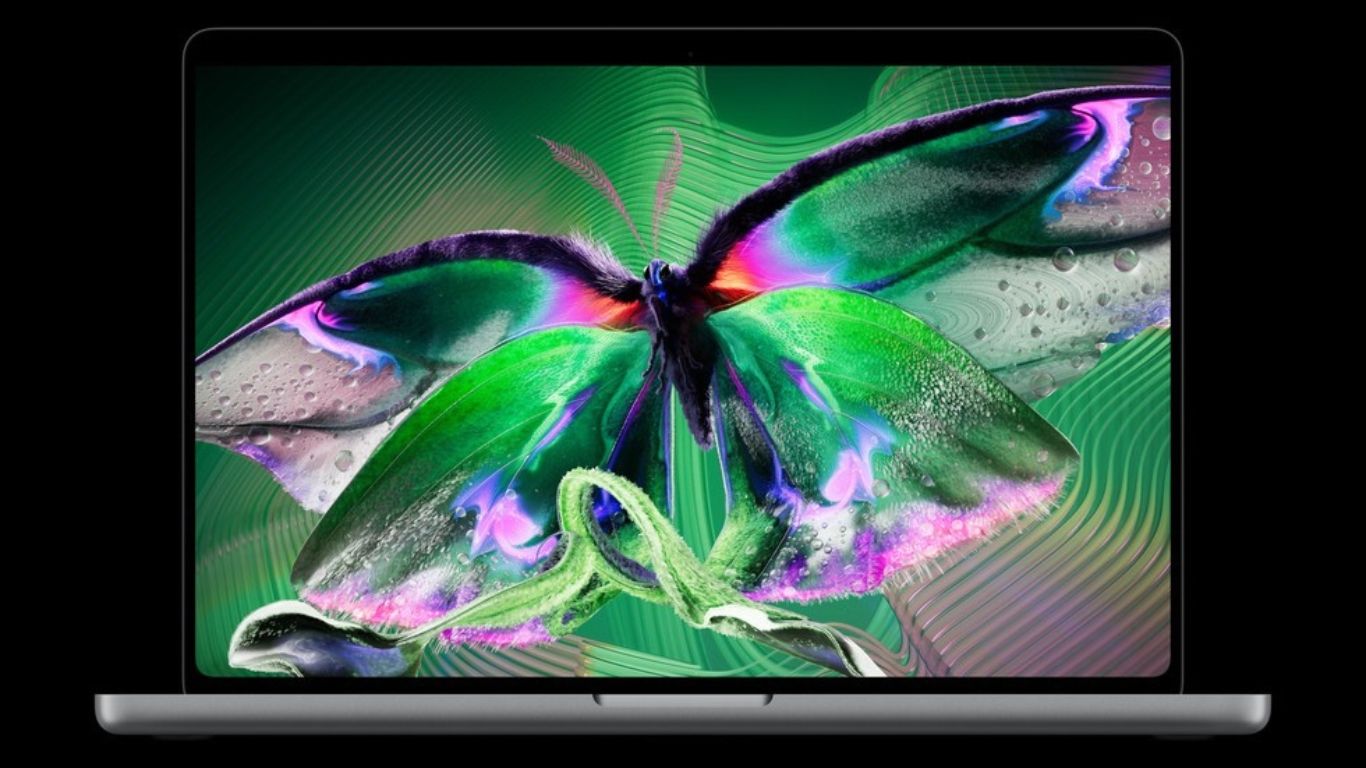
Apple has introduced its PROLED XDR display, which uses advanced tandem OLED technology. It is designed to deliver better brightness, contrast, and colour accuracy compared with previous MacBook Pro displays.
Here are some of its key specifications:
- Tandem OLED display technology.
- Up to 2,000 nits peak HDR and SDR brightness.
- 10,000,000:1 contrast ratio.
- Adaptive refresh rates up to 120Hz.
- Support for P3 and Adobe RGB colour spaces.
- Optional nano-texture glass to reduce reflections.
What Makes Tandem OLED Different?
Traditional OLED displays use one layer of self-illuminating pixels. Tandem OLED technology uses two pixel layers to improve brightness and display performance.
This helps the new MacBook Pro produce deeper blacks, brighter highlights, and more detailed images.
The improved contrast is especially useful when watching HDR videos, editing photographs, or working with professional video content.
The wider colour support also makes the display useful for photographers, graphic designers, and video editors who need accurate colours.
For people who regularly work with visual content, this display could be one of the biggest reasons to consider the new model.
Touchscreen Experience and macOS 27
Hardware is only one part of the touchscreen experience. Apple has also updated its operating system to support the new way of interacting with Mac.
The new MacBook Pro runs macOS 27, which includes touch-focused improvements.
Apple has also introduced Dynamic Island on Mac. It provides quick access to Spotlight search, Live Activities, and Siri AI.
For creative professionals, touchscreen support could make several applications easier to use.
For example:
- Designers can draw and edit directly on the display.
- Video editors can move clips and adjust timelines using touch.
- Musicians can interact with virtual instruments.
- Developers can test touch interactions in their applications.
Apple is also working with third-party software developers to bring improved touch experiences to applications such as Microsoft Office, Adobe Lightroom, DaVinci Resolve, Blender, and other creative tools.
The important point is that users do not have to abandon traditional controls. They can switch between touch, keyboard shortcuts, and trackpad gestures depending on the task.
Battery Life and Connectivity
Battery life remains an important consideration for professional laptop users.
Apple claims that the new MacBook Pro offers up to 24 hours of battery life, depending on the model and usage.
This makes it suitable for people who travel frequently or work away from a power outlet.
The laptop also supports fast charging, allowing it to reach up to 50% battery in approximately 30 minutes with a compatible power adapter.
Connectivity options include:
- Three Thunderbolt 5 ports.
- HDMI port.
- SDXC card slot.
- MagSafe charging.
- 3.5mm headphone jack.
- Wi-Fi 7 and Bluetooth 6.
These connections make it easier to connect external displays, storage devices, cameras, and other professional equipment.
MacBook Pro 2026 vs Previous MacBook Pro Models
The new model brings several changes compared with earlier MacBook Pro generations.
| Feature | Previous MacBook Pro | New MacBook Pro 2026 |
|---|---|---|
| Display | Liquid Retna XDR | PROLED XDR tandem OLED |
| Touchscreen | No | Yes |
| Display Brightness | Up to 1,600 nits HDR peak | Up to 2,000 nits |
| Contrast Ratio | Up to 1,000, 000:1 | 10,000,000:1 |
| Processor | Earlier M-series chips | M5 pro and M5 Max |
| Refresh Rate | Up to 120HZ | Up to 120 hz |
| Operation System | Earlier Mac OS version | macOS 27 |
The biggest difference is not simply processing power. It is the combination of touchscreen interaction and the new display technology.
Previous MacBook Pro models already offered excellent performance and displays. However, they did not allow users to interact directly with the screen.
The 2026 model changes that experience.
MacBook Pro 2026 Price and Availability
Apple announced the new MacBook Pro on October 28, 2026.
Pre-orders started on October 28, with the first customer deliveries and retail availability scheduled for November 6, 2026, in supported markets.
The official starting prices in the United States are:
| Model | Starting Price |
|---|---|
| 14-inch M5 pro | $2,899 |
| 16-inch M5 pro | $3,399 |
| 14-inch M5 max | $4,499 |
| 16-inch M5 Max | $4,799 |
These are US starting prices. Higher memory, storage, and other configurations can increase the final cost.
Availability and local pricing may differ by country. Buyers in Nepal and other markets should check with authorised Apple resellers for regional pricing and availability.
Who Should Buy the New Touchscreen MacBook Pro?
The new MacBook Pro is not necessarily the right upgrade for everyone. Its benefits depend on how you use your laptop.
- Creative professionals: Photographers, graphic designers, video editors, and 3D artists may benefit from the improved display and direct touch interaction.
- Developers and engineers: The M5 Pro and M5 Max chips offer powerful hardware for software development, AI workloads, and complex projects.
- Students and professionals: Users who regularly work with multiple applications, presentations, and demanding software may appreciate the additional flexibility.
- Existing MacBook Pro users: People using older Intel-based or earlier Apple silicon models may find the new features attractive.
However, if your current MacBook Pro already handles your daily work comfortably, there may be no urgent reason to upgrade.
What Does Touchscreen Technology Mean for Future MacBooks?
The introduction of touchscreen support could influence the direction of future MacBook products.
Apple has traditionally maintained a clear difference between MacBooks and iPads. MacBooks focused on keyboard and trackpad interaction, while iPads offered direct touch controls.
The new MacBook Pro brings these experiences closer together.
In the future, we could see more applications designed around touch interaction, better creative tools, and additional ways to control macOS.
However, Apple has not confirmed that every future MacBook will include a touchscreen. The technology is currently a feature of this new MacBook Pro generation.
Is the 2026 MacBook Pro Worth the Upgrade?
The new MacBook Pro represents an important change in Apple’s laptop lineup. Touchscreen support, tandem OLED technology, M5 Pro and M5 Max performance, and a lighter design make the 2026 model different from previous generations.
For creative professionals, the improved display and touch controls could make everyday work more flexible. For other users, the traditional MacBook experience remains available through the keyboard and trackpad.
If you are considering an upgrade, compare the new features with your current MacBook and choose a configuration that matches your actual needs.
If your existing MacBook is experiencing hardware or performance problems, you can also check professional MacBook repair services in Dubai before deciding whether replacing your device is necessary.
The new MacBook Pro is expected to feature a 14-inch or 16-inch display, depending on the model. Both options are designed for professional work and creative tasks.
Yes. This is Apple’s first MacBook Pro with touchscreen support, allowing users to interact with macOS using finger gestures alongside the keyboard and trackpad.
The M5 Max configuration supports up to 128GB of unified memory, making it suitable for demanding creative projects, 3D work and AI applications.
The new MacBook Pro brings advanced display technology inspired by Apple’s Pro Display XDR, offering improved visual quality for professional tasks.
Selected configurations offer up to 16TB of SSD storage, providing plenty of space for large video files, creative projects and professional applications.