

MacBook SD Card Slot Repair in Dubai: Fix Problem without Mac Replacement
If you are someone who works with photographs, video recordings, graphics and so on, then SD card slot becomes a necessity in your MacBook setup. When the card reader starts acting up by not being able to recognize the inserted card, or gets disconnected while transferring files or accessing data, it is very frustrating.
But a broken SD card reader is not always a reason for replacing the whole MacBook.
Professional MacBook SD Card Slot Repair in Dubai concentrates on the diagnosis of the card reader itself, the card slot, the corresponding connectors, and other relevant hardware without thinking about any replacements immediately. In some cases when the SD card reader slot is the damaged element among others, the rest of MacBook parts can work fine.
All in all, the repair process is oriented around one simple question:
What went wrong and what can be saved?
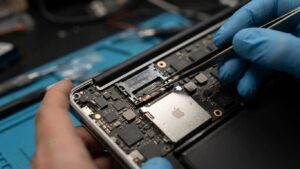
MacBook SD Card Slot Repair in Dubai
Which MacBooks have an SD Card Slot?
Not all MacBook models come with the built-in SD card reader.
There are MacBook models, especially the pertinent MacBook Pro models, which have an SD card slot where one can insert compatible memory cards.
When there is a case where the SD card reader on your MacBook malfunctions without any prior notice, you will need a professional to diagnose if the issue is due to the card itself, the software, the slot, the hardware, or an internal connection.
Common MacBook SD Card Slot Problems
SD card reader problems can appear in several ways.
Common symptoms include:
- MacBook does not detect an SD card
- SD card appears and disappears
- Card reader works intermittently
- SD card transfers stop unexpectedly
- MacBook cannot mount the card
- Multiple known-working cards fail
- SD card slot becomes physically loose
- Card is difficult to insert or remove
- Reader stops working after physical damage
- SD card reader fails after liquid exposure
- Cards work on other computers but not your MacBook
The specific symptom can provide useful clues, but professional testing is often needed to identify the exact cause.
Why Is My MacBook Not Reading an SD Card?
There are several possible reasons.
Faulty SD Card
The memory card itself may be damaged or corrupted.
Testing another known-working SD card can help determine whether the problem is with the card or the MacBook.
File System or Formatting Issue
A card may not mount correctly because of its format, corruption, or another storage-related problem.
Software or macOS Issue
System problems can sometimes affect how external storage devices are recognized.
Dirty or Damaged Slot
Dust, debris, or physical damage inside the card slot can interfere with proper contact.
Faulty Card Reader
The card reader hardware may fail and stop communicating correctly with inserted cards.
Internal Connection Problem
The reader relies on internal connections to communicate with the MacBook. A damaged or loose connection can cause intermittent or complete failure.
Physical or Liquid Damage
A drop, impact, or liquid spill can potentially affect the card reader and surrounding hardware.
Signs the SD Card Slot May Have a Hardware Problem
Not every SD card issue requires hardware repair.
However, hardware diagnosis becomes more relevant when:
- Several known-working cards fail
- The MacBook does not detect any compatible SD card
- The reader works intermittently
- Cards disconnect during use
- The slot has visible physical damage
- The problem began after an impact
- The problem started after liquid exposure
- Software troubleshooting has not helped
Testing multiple cards and, where appropriate, another compatible device can help isolate the source of the problem.
MacBook SD Card Slot Repair vs. Replacing the MacBook
A faulty card reader is a specific hardware problem. It does not automatically mean the MacBook itself needs replacement.
Your MacBook may still have a perfectly functional:
- Display
- Logic board
- Internal storage
- Keyboard
- Trackpad
- Battery
- Speakers
- Camera
- Wi-Fi
- Processor and memory
- Other ports
If the SD card reader is the only problem, targeted repair can help restore data access while preserving the rest of the computer.
This is the central idea behind MacBook SD Card Slot Repair in Dubai: repair the affected card-reading system rather than replacing a MacBook that otherwise works.
What Does MacBook SD Card Slot Repair Involve?
A professional repair process should begin with diagnosis.
1. Test Multiple SD Cards
Known-working cards can be used to determine whether the problem is limited to one memory card.
2. Check macOS Detection
The system can be checked to determine whether the inserted card or reader is being detected.
3. Inspect the Card Slot
The slot can be examined for debris, physical damage, bent contacts, or other visible problems.
4. Test Card Reading
The reader can be tested for consistent detection, mounting, and data access.
5. Inspect Internal Connections
If the problem appears hardware-related, the relevant internal connections and reader hardware can be inspected.
6. Assess Physical or Liquid Damage
If the problem began after an accident or spill, the surrounding internal components may require additional inspection.
7. Perform Targeted Repair
Where technically possible, the affected card reader, slot, connection, or applicable component can be repaired or replaced.
8. Test Data Access
After repair, multiple compatible cards can be tested to confirm stable detection and data access.
SD Card Slot Not Working After a Drop
A physical impact can affect the card slot or its internal connections.
If your MacBook was dropped and the SD card reader stopped working afterward, the slot should be inspected rather than assuming the logic board or entire MacBook is damaged.
Possible symptoms include:
- Card is not detected
- Card works only when positioned a certain way
- Reader disconnects unexpectedly
- Slot feels loose
- Card insertion becomes difficult
- Data transfers stop intermittently
Professional diagnosis can determine whether the physical impact affected the slot, reader, connection, or another component.
SD Card Reader Problems After Liquid Damage
Liquid exposure can affect external ports and internal electronics.
However, in the case that a card reader stops functioning due to a water spill, coffee spill, or any other form of liquid leakages, then the problem might be beyond the card reader itself.
Intermittent damage to other connection points might happen.
Professional diagnosis will help identify if the problem only concerns the card reader alone, or other hardware components need attention too.
Why Should One Refrain From Forcing the Insertion of an SD Card Into its Slot?
If insertion and extraction of an SD card become difficult, do not force the process.
Doing so can cause damage to either the slot, the contacts, or even the card itself.
In case the card gets stuck, seek professional help to safely extract it rather than applying extreme force or inserting sharp objects.
Can a Damaged SD Card Be Repaired?
The SD card itself is separate from the MacBook’s card reader.
If one particular card is not recognized while other known-working cards function normally, the card may be the problem.
If multiple compatible cards fail on the MacBook but work elsewhere, the MacBook’s reader or related system may require investigation.
This distinction is important because replacing the MacBook will not necessarily solve a damaged memory card problem.
Why Accurate Diagnosis Matters
Imagine this situation:
Symptom: MacBook does not detect an SD card.
Possible cause: Damaged SD card.
Wrong approach: Replace the MacBook’s card reader immediately.
Better approach: Test the card and other known-working cards first.
Another example:
Symptom: Multiple SD cards fail.
Possible cause: Faulty card reader or internal connection.
Better approach: Inspect the MacBook’s SD card slot and relevant hardware.
Accurate diagnosis prevents unnecessary component replacement and helps identify what can be preserved.
“What We Saved” With SD Card Slot Repair
The value of repair is not only the component that gets fixed.
Consider a MacBook where:
The problem: SD card slot no longer reads memory cards.
Still working: Display, logic board, SSD, keyboard, trackpad, battery, speakers, camera, Wi-Fi, and other ports.
Repair goal: Restore the SD card reader while preserving the rest of the MacBook.
This is the “What We Saved” approach.
Instead of replacing an entire computer because one connectivity feature has failed, targeted repair can restore the specific function that you actually need.
Why Choose Professional MacBook SD Card Slot Repair in Dubai?
A MacBook’s internal components are compact, and card reader repairs require careful handling.
Professional repair can provide:
Detailed Diagnosis
Determine whether the problem originates from the SD card, software, slot, reader, connection, or another component.
Targeted Repair
Focus on the affected card-reading system instead of replacing unrelated hardware.
Preservation of Working Components
Keep the MacBook’s display, logic board, storage, keyboard, battery, and other components in service.
Functional Testing
Test multiple compatible SD cards after repair to verify reliable operation.
Better Repair Decisions
Understand the actual fault before considering a larger replacement.
How to Protect Your MacBook’s SD Card Slot
Insert compatible SD cards carefully and avoid forcing cards into the reader. Keep the card and slot free from excessive dust and debris.
Always eject the card properly before removing it when required by the operating system or workflow.
Avoid inserting damaged or visibly bent cards, as they can potentially damage the slot.
If the reader starts behaving intermittently, address the issue early rather than repeatedly inserting and removing the card.
When Should You Get MacBook SD Card Slot Repair?
Professional diagnosis may be appropriate if:
- Your MacBook does not detect any known-working SD cards
- The SD card reader works intermittently
- Cards disconnect during transfers
- The card slot is physically damaged
- The card reader stopped working after a drop
- The reader stopped working after liquid exposure
- The SD card works on another computer but not your MacBook
- Software troubleshooting has not resolved the problem
Early diagnosis can help prevent further damage to the slot or connected components.
Restore Data Access Without Replacing the Mac
For photographers and other professionals, losing access to an SD card reader can interrupt an entire workflow.
But one failed card slot does not mean your MacBook has to be replaced.
If the internal display, storage, logic board, keyboard, battery, and other components are still working, targeted MacBook SD Card Slot Repair in Dubai can focus on restoring the specific card-reading function.
The goal is to identify whether the issue is the card, software, slot, reader hardware, or internal connection—and then repair the affected component where technically possible.
Get Professional MacBook SD Card Slot Repair in Dubai
If your MacBook’s built-in SD card reader has stopped recognizing cards, disconnects during transfers, or has suffered physical or liquid damage, professional diagnosis can help identify the real cause.
You may not need a new MacBook. You may only need the affected card reader or related connection repaired.
With MacBook SD Card Slot Repair in Dubai, the focus is on restoring data access while preserving the working parts of your MacBook.
Fix the card reader. Restore your workflow. Save the MacBook that still works. WhatsApp us today for professional repair support.
FAQ
1.What may be the reason for my MacBook being unable to read the SD card?
The possible reasons may be the SD card itself, formatting issues, any foreign substance in the slot, damages to the card reader, connection issues or damages, including physical and water damages. To find out whether the SD card or MacBook have some issues, you should try putting in other SD cards, working well.
2.Can the slot of my MacBook be fixed without purchasing a new MacBook in Dubai?
It depends on the model of your MacBook and the reason for the malfunctioning. However, if the issue lies only in the slot, reader or the connection, then it can be solved with MacBook SD Card Slot Repair in Dubai.
3.Can I put the SD card into a damaged card slot of the MacBook?
No, it will only make your situation even more complicated. You shouldn’t force the SD card to enter the slot.
